How to sort holiday photos
You come home from a week away with hundreds of photos: several places, near-duplicates, screenshots of tickets and menus. Sorting them while you still remember what is what takes minutes. Sorting them a year later takes an evening. Here is a method that works on any Android phone, and how Snapisodes does the dull part for you.
The plain way, with the gallery app you already have
- Make an album for the trip as soon as you are home, named with the place and the year, for example “Croatia 2026”.
- Add the photos day by day. Most galleries show one day at a time, which is easier than scrolling through everything.
- Delete the obvious misses first: blurred shots, duplicates, screenshots, photos of tickets. A smaller set is much easier to sort.
- Mark the best photos as favourites and add a short description to the ones worth remembering: who was there, what you ate, where it was.
- Back the album up (Google Photos, OneDrive or a copy of the files) before you free space on the phone.
This works, but every step is manual, and the descriptions often live only inside one gallery app.
The same with Snapisodes
- Start an episode before you leave Open Snapisodes and start an episode on the home screen, for example “Holiday in Croatia”. It ends at a set time or by hand with one tap.
- Shoot with your normal camera Use your phone’s own camera with all its modes. Every new photo joins the running episode by itself, so there is nothing to sort in the evening.
- File older photos afterwards Forgot to start an episode? Photos from earlier can be added to one later, a whole day or a period at once.
- Add a few words to the best shots Tap the microphone on a photo and say what it shows, or type it. In JPEG files the comment is written into the photo itself.
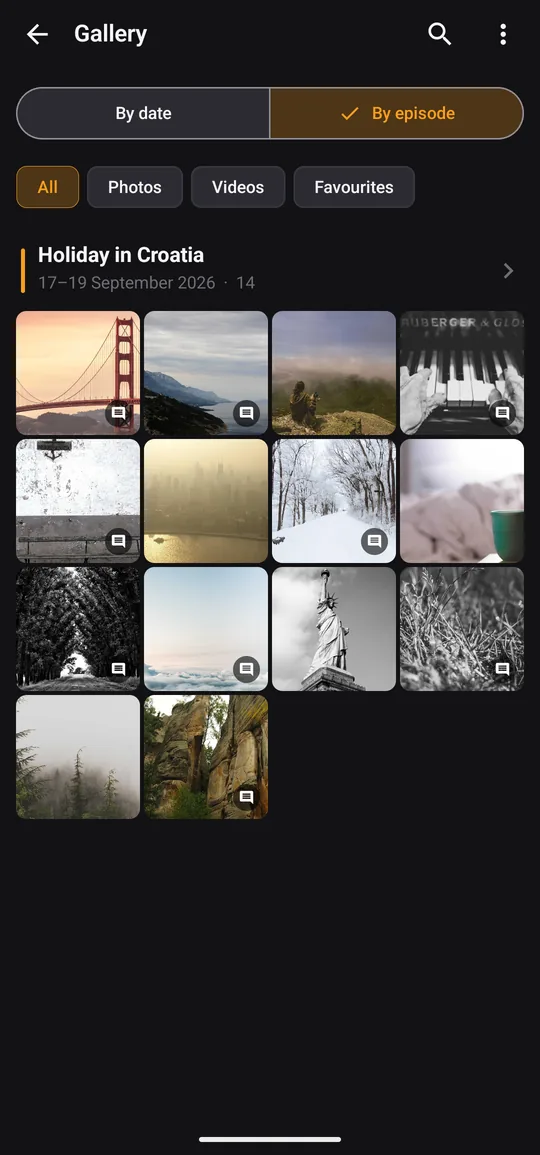
- Switch the gallery to episodes In the gallery tap “By episode”. The trip is one block with all its photos, and a map if the photos have GPS.
What to expect
Snapisodes does not move your photos. An episode is a label kept in the app and, for JPEG photos, in the photo’s metadata, so the files stay where they were. You decide what belongs to an episode: you start it, or you file older photos yourself. The app needs no account and shows no ads.
The free version, after a 14-day trial of everything, allows 3 new episodes and 20 newly commented photos a month, with comments up to 20 characters. Pro is a one-time purchase that removes these limits. Nothing you have already made disappears.
Try it on your next trip
14 days of Pro free, no account, no ads.